
Firmware for the M-VAVE FM-1 · Version 1.1 · GPLv3
ESATEK303
The VCV Rack 303, inside the FM-1.
The ATEK303 voice and its acid pattern generator, in a pocket synth. Press PLAY and a line plays; turn the knobs and it moves. No computer and no cables, if you like.

The ATEK303 voice
The same engine as the VCV Rack module: Open303 with the ATEK oscillator and diode filter, modelled on the 303 schematic. Against the original the difference stays at -51 dB: it is the same sound. With its fine tuning, as in VCV.
The acid pattern generator
SEQ makes a new line of up to 64 steps; the mutations change the rhythm, the octaves or the slides and accents. It is the ATEK303 SEQ algorithm: the same seed gives the same pattern in VCV and on the FM-1.
Stereo effects
Distortion (overdrive, RAT or fuzz), chorus or flanger, a tempo-synced ping-pong delay and a plate reverb. At the output, a limiter that makes it louder without clipping.
Step editor and presets
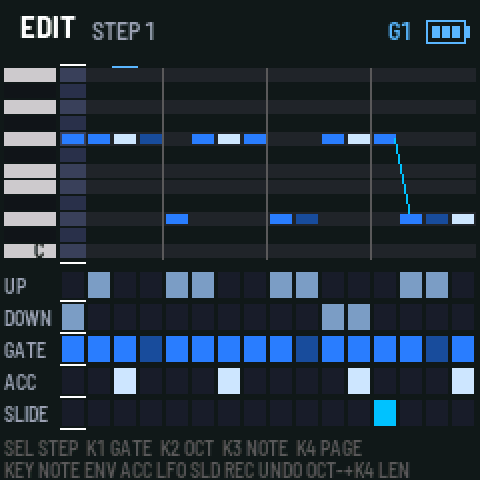
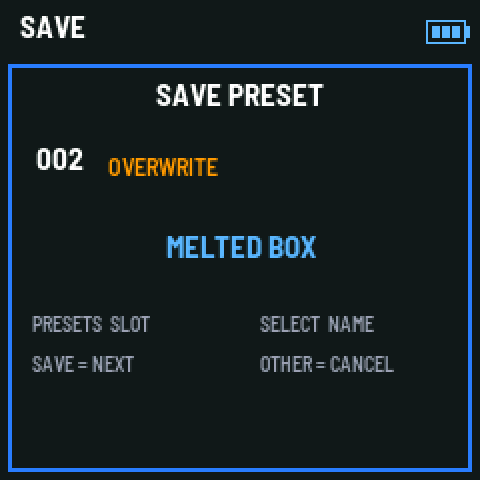
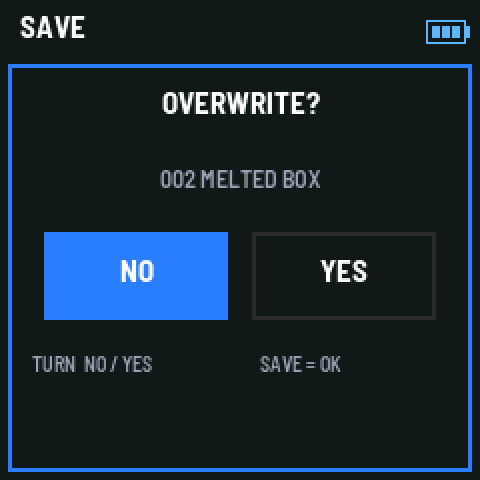
A piano roll in pages of 16 steps to touch up the pattern note by note, 12 factory presets and 32 slots with a save screen that asks before overwriting.
MIDI in and out
Notes, CC and clock in; the sequencer's notes and the clock go out over USB, to record the line in your DAW or play another synth with it.
Try it in the browser
The same firmware built for the web: the FM-1 on screen, with sound, nothing to install.
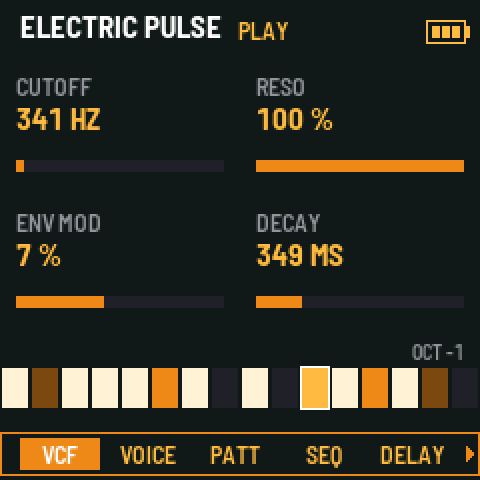
The screens
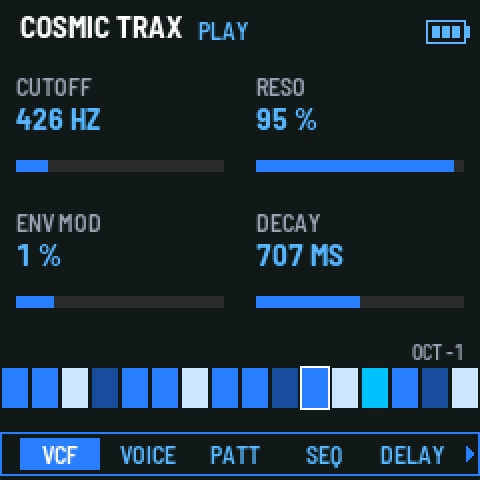
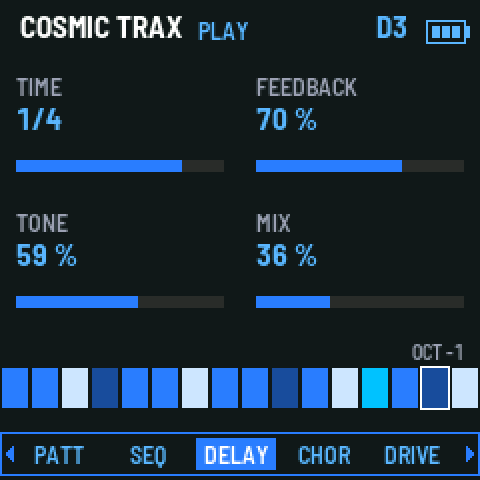
Manual
How to use it
The buttons
| PLAY | Starts and stops the sequencer. If MIDI clock comes in, it follows it. |
|---|---|
| SEQ | A new pattern (new seed). While playing, it comes in on the next bar. With LOCK on, it mutates the three layers instead. |
| ENV / LFO / ARP | Mutate the rhythm, the notes (octaves) and the slides and accents of the page on view. In the editor, ENV toggles the accent and LFO the slide. |
| REC | Undoes the last mutation or edit. |
| GLO | LOCK: SEQ mutates instead of making a new seed. |
| EDIT | Opens and closes the step editor. |
| FX | Jumps to the effect pages; pressed again, to the next one. |
| HOME | Steps through VCF, VOICE, PATT and SEQ; from the editor, the list or an effect, back to VCF. |
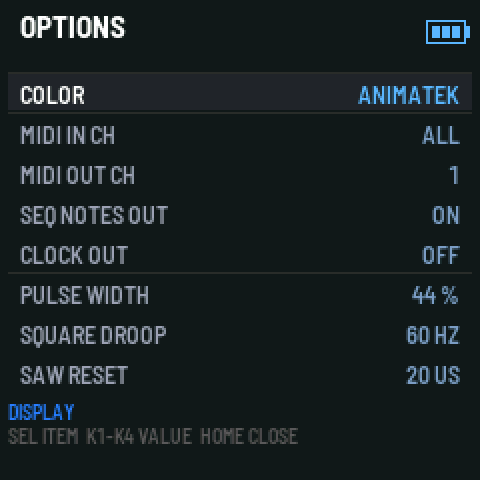
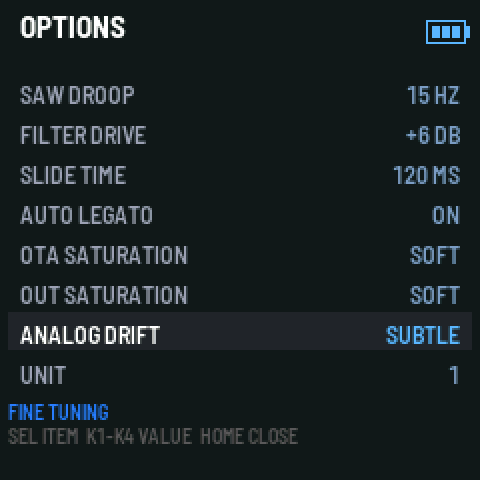
| OCT− + HOME | OPTIONS: screen colour, MIDI channels, notes and clock out, and the voice's fine tuning. |
| SAVE | Opens the save screen: slot and name; over a slot in use it asks OVERWRITE? NO / YES. |
| OCT− / OCT+ | The octave (OCT− on release, since it also works in combinations). |
| Keys | With the sequencer stopped they play the voice: legato slides and a hard press is an accent. With the sequencer running they transpose the pattern: the key becomes the root. |
The pages
SELECT walks the eight pages; each puts four parameters on K1 to K4. The navigator at the bottom of the screen marks the page you are on.
First steps
- Press PLAY: preset 01, COSMIC TRAX, plays.
- Press SEQ for another pattern, or ENV, LFO and ARP to mutate the one playing. REC undoes.
- Turn K1 to K4 to change the sound. SELECT changes page and the navigator at the bottom tells you where you are.
- Press a key while it plays to transpose the line.
- Press SAVE twice: it is kept as a preset with an acid name.
The sequencer
- Patterns come from the ATEK303 SEQ generator: scale degrees with their octave, ties, slides and accents. SCALE and ROOT change the output without losing the pattern.
- Up to 64 steps in four pages of 16: the strip shows the page playing, with four marks above it.
- DENSITY, RANGE, ACCENTS and SLIDES regrow the pattern from the same seed in real time: raising the density adds notes without changing the ones there.
- With external MIDI clock it follows START, STOP and CONTINUE at six ticks a step, step-exact with the DAW. On screen the tempo says EXT.
The step editor
- EDIT opens it. SELECT walks the 16 steps of the page and K4 changes page.
- K1 changes the gate (rest, note or tie), K2 the octave and K3 the note a semitone at a time. A key sets the step's note and moves on.
- ENV toggles the accent and LFO the slide. A slide into the same note plays legato, as on a 303.
- Hold OCT− and turn K4 to change the pattern length (1 to 64 steps).
Presets
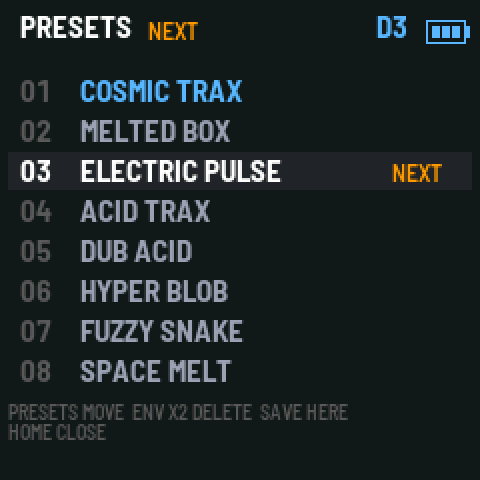
- 12 factory presets and 32 slots in the FM-1's memory, with an internal backup copy: a power cut halfway through saving does not lose them.
- Each preset keeps the pattern (with its seed and mutations), the voice, the effects, the tempo, the scale, the root and the octave.
- Turn PRESETS to open the list: the cursor loads each preset as it passes. While playing, the change waits for the end of the pattern, as on a 303 (NEXT). ENV twice deletes the selected one and HOME closes the list.
- The presets can be copied to the computer and back over USB with fm1-base's backup tool.
OPTIONS (OCT− + HOME)
- COLOR: the Animatek blue or the fm1-base themes (green, amber, cyan, red and mono).
- MIDI: input channel (all or one), output channel, the sequencer's notes over USB and the clock out.
- FINE TUNING: the same menu as the VCV ATEK303: pulse width, oscillator droops, filter drive, slide time, auto-legato, saturations, analogue drift and unit.
- The options belong to the unit, not to the presets, and are saved when you close the menu.
MIDI
- In over USB and the TRS minijack: with the sequencer stopped, notes play the voice (velocity 100 or more: accent; overlapping notes: slide); running, they transpose the pattern.
- CC 74 cutoff, 71 resonance, 75 env mod, 76 decay, 77 accent, 78 tune and 79 wave.
- Out over USB: the keys and the sequencer's notes (accent at velocity 127) and, if switched on, the clock.
Install
Download the .fwsc file of release 1.1 on GitHub and install it with the community web installer (Chrome or Edge) or with fm1-base's fm1_install.py script. It has also been sent to The Firmware Hub, to install it from there in one click.
Tested on a real FM-1: it installs from the stock V15 firmware and from another firmware, and you can leave it again. It carries the community update loader, so you can always install another one over it or go back to the official M-VAVE firmware.
Presets saved with 1.0 do not load in 1.1 (the format changed with the 64 steps).
Credits and licence
ATEK303 for FM-1 is free software (GPL-3.0) by Animatek.
The voice starts from Open303 by Robin Schmidt (MIT licence).
It runs on fm1-base by Charles Vestal (MPL-2.0) and felucca-bsp by Hügelton Instruments (MPL-2.0).
Before you install
An unofficial firmware is installed at your own risk
Installing a community firmware is safe if you take care, but it is not made or endorsed by M-VAVE. Four things worth knowing:
Back up first
Before changing firmware, save your sounds and projects with the tool of the firmware you have. Each firmware uses the memory its own way, and the new one may overwrite what was there.
Battery and cable
A charged battery, a data cable straight to the computer (no USB hub) and Chrome or Edge, the browsers with Web MIDI. Do not unplug anything until it finishes.
Back to the stock one
You can always go back to the M-VAVE firmware with its updater or with The Firmware Hub.
If something goes wrong
If the firmware fails to start twice, the FM-1 drops into a safe mode with USB on, to reinstall. Holding REC at power-on enters the chip's update mode. For an FM-1 that does not start, there are community rescue tools over USB.
M-VAVE and FM-1 are trademarks of their owners; TB-303 is a trademark of Roland Corporation. They are used here only to identify the device and the reference sound. These firmwares are independent Animatek projects, not affiliated with M-VAVE or Roland.