
Animatek NME
Nord Modular Editor G1
A modern, native, open-source editor for the legendary Clavia Nord Modular G1, rebuilt from scratch with JUCE/C++. Runs on Windows, macOS and Linux with no Java or legacy runtime required.
Nord Modular is a trademark of Clavia DMI AB. This project is an independent, community-developed editor and is not affiliated with or endorsed by Clavia.
Interested in the Nord Modular G1?
A mailing list just for the G1: news about Animatek NME and G1-Emu, new releases and videos. Unsubscribe with one click.
Native editor · G1 workflow · current systems
What is Animatek NME?
A modern control room for the Nord Modular G1: patch editing, hardware communication and bank management rebuilt as one native desktop tool.
Revives the original Nomad-style patch workflow without old Java runtimes.
Edits .pch patches, modules, cables, morphs, MIDI CCs and hardware knob assignments.
Keeps the project open-source while beta builds are distributed to Patreon supporters.
Canvas & navigation
- Poly/Common modular canvas - pixel-oriented visual patch editing, split like the original editor.
- Zoom & pan - canvas zoom, smooth navigation and cable visibility tools.
- Enhanced QuickAdd - fast module search, relevance-ranked results and double-click on empty canvas.
- Search tags - all 110 modules include hand-written synonyms such as lp, hp, vca, s&h, glide, bitcrush, wah, acid, arpeggio and sidechain.
- Favorites - gold-starred modules appear first and persist across sessions.
- Multi-selection and fast editing - drag & drop, copy, paste, duplicate and duplicate with cables.
- .pch snippets - reusable module groups dragged directly into the canvas.
- Full Undo/Redo - modules, cables, parameters, morphs and renames; multi-module operations undo in one step.
Modules & visuals
- 110 rendered modules - knobs, sliders, displays and custom components.
- 382 audited connectors - 1:1 mapping against module descriptors; connector direction and shape derived from descriptors.
- 43 corrected jacks - jack colours now match their signal type.
- Consistent signal colours - audio, control and logic remain recognizable across jacks and cables.
- 13 visual themes - including Nord Classic, a light warm-grey theme sampled from the original Clavia editor. Themes cover the whole app, not just the canvas.
- Context-aware icons and displays - waveform shapes, Hz, degrees, BPM, seconds or ratios depending on context.
- Cable tools - shake function for overlapping cables and indicators for hidden cables.
- Module presets - named parameter snapshots for any module, recalled from the Inspector in one undo step and shared as plain-text .pchp packs.
- Per-module DSP cost - shown in the Add Module menu, the browser, Quick Add and the Inspector, with F10 to label the whole patch at once.
Parameters, morphs and patch management
- Bidirectional real-time editing - knobs, sliders and buttons synchronized with the synth.
- Values on hover - every control reads out in its own units while you point at it or drag it.
- Patch-wide readouts - F5, F7, F8, F9 and F10 label values, morph groups, knob assignments, MIDI CCs and DSP cost across the patch.
- Morphs and assignments - edit morphs, hardware knobs and MIDI CC mappings from the editor.
- Parameter Lock - protect parameters during initialization and randomization.
- Randomize / Initialize - musical randomization with automatic exclusions for morphs, mutes and volumes.
- Patch Settings - voices, keyboard/velocity range, pedal, bend range, portamento, octave shift and retrigger.
- Snapshots / variations - 8 patch states per slot with interpolation, stored in a .var sidecar so the .pch stays byte-standard.
Synth communication
- Full MIDI SysEx - connection, port auto-detection and state synchronization.
- Multi-Slot A/B/C/D support - each slot has independent patch state and undo history, and lives in its own tiled sub-window inside the main window.
- Slot switching fixed - switching from the slot bar or Ctrl+1..4 now loads the selected slot patch correctly.
- Patch Browser - browse synth memory and local disk presets.
- 891 patch slots - 9 banks x 99 slots.
- Bank transfer tools - save bank to disk, send folder to synth and backup all 9 banks into the preset library.
- .pch import/export - compatible with classic patch workflows.
- Connection watchdog - recovers stuck fetch states after front-panel bank/patch changes.
- Controller Snapshot - sends current MIDI CC assignment values for sequencing and recording workflows.
Beta log
0.13.0 · August 2, 2026
- Four slots, one window - the slots are tiled sub-windows inside the main window. One fills the area, two split it, three go in thirds, four go 2x2, and the layout re-flows as you open and close them.
- Slot layout under your hands - Ctrl+Shift+1..4 shows or hides a slot, F11 blows the focused one up to full size, and Ctrl+Shift+arrows moves it to the neighbouring tile. Your arrangement comes back next session.
- Every module's DSP cost, everywhere you pick one - in the Add Module menu, the browser, Quick Add and the Inspector, rounded to the same figures the original Clavia editor prints. F10 labels the whole patch at once.
- Values on hover - rest the cursor on any control and read it in the parameter's own units, so a cutoff reads 440 Hz rather than 64. F5, F7, F8 and F9 label the whole patch with values, morph groups, knob and MIDI CC assignments.
- Module presets became a library - any module can have named parameter snapshots, recalled from the Inspector in a single undo step and stored as hand-editable .pchp packs in your patch library.
- macOS runs on High Sierra again - release builds target 10.13, and packaging verifies both the bundle and the Intel binary so the metadata cannot drift back.
- Instant slot switching - every enabled slot is prefetched in the background on connect, and a transfer in one slot no longer blocks editing another.
- Slot chooser with a Local option - opening a patch asks where it goes; Local loads it into the editor only, and the slot carries a LOCAL badge until it matches the synth.
- 13 themes and theme-aware chrome - menu bar, header, status bar, Inspector and dialogs all follow the palette, including the new Nord Classic.
- Hardware knob-assignment map - a four-panel, 18-LED diagram in the Inspector mirroring the physical knob layout.
- MCP bridge - an opt-in local channel that lets an AI assistant build, wire, mutate, save and store patches through the editor's own undo system.
- Undoable module rename - renaming from the canvas, the Inspector or the bridge is a normal undoable edit.
- Voices control and one-decimal DSP load - rapid voice changes are coalesced into a single upload so they cannot corrupt the slot.
- Two-level slot model fixed - selected versus enabled slots now match the hardware exactly, Ctrl+click included.
- Chained input-to-input cables, matching the original editor, with the one-output-per-net rule enforced.
- Large patches fixed on Linux - a JUCE ALSA bug truncated SysEx over ~256 bytes; the bundled patch restores cables and modules on heavy patches.
- Reliable fetches from a busy synth - a rack at 99-100% DSP no longer drops patch transfers.
- Better Mutator results - mutation and randomization no longer wreck pitch and cutoff, and oscillator pitches snap to musical intervals.
- Sequencers fixed - the arrow buttons step both ways again, and Clr empties the steps instead of resetting the whole module.
- PCH2 filter - legacy 2.10 patches are tagged and can be hidden in the disk browser.
Floating windows
-
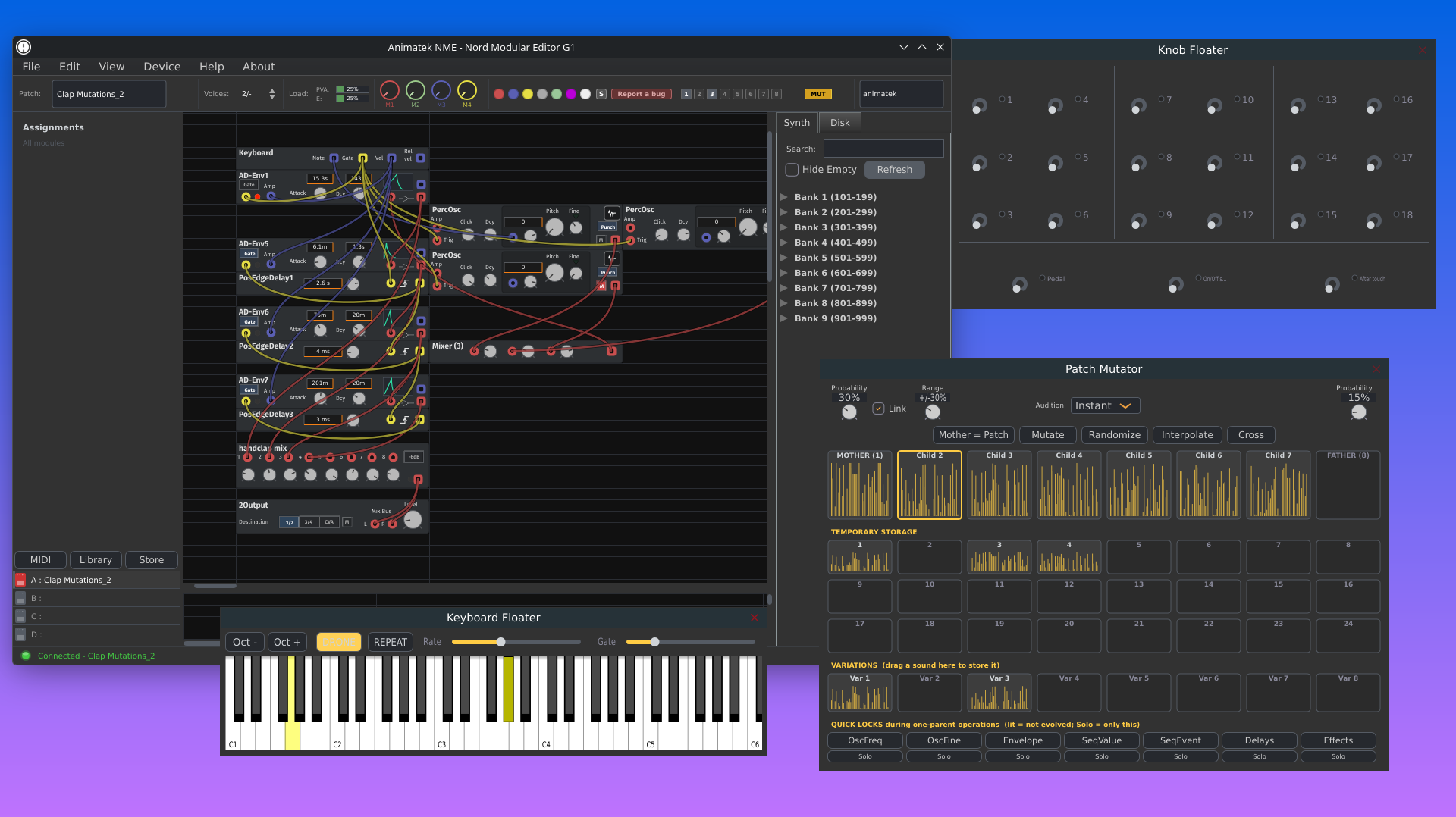
Knob Floater - live overview of 18 assignable knobs + Pedal, On/Off and Aftertouch. Interactive, synced and undoable.
-
Keyboard Floater - virtual keyboard that plays the synth through the editor protocol, with DRONE and REPEAT modes.
-
Patch Notes Floater - free-text patch notes saved inside .pch files under [Notes]. Monospaced font for ASCII tables.
-
Window persistence - main window and floaters remember size, position, maximized state and display.
What is coming next
The Patch Mutator, the extra themes and the four-slot tiled workspace all shipped. What is next is depth rather than breadth: an editor-side meta-modulation layer, more work on the plugin build, and whatever the hardware testing on real racks turns up. Animatek NME is not just about opening old patches again; it is about making the Nord Modular G1 comfortable in a modern setup.
Do you own a Nord Modular G1 and want to try the new editor?
Animatek NME is in active beta development. You can support the project and access the builds through Patreon, or follow the code and report issues on GitHub.